
Pay a Person makes sending money fast, easy, and secure.
Whether you’re splitting a meal, covering shared expenses, or sending a quick gift, you can move money anytime through online banking or the mobile app.
With just a few simple steps, you can send funds to anyone in the United States who has a checking or savings account—using only their email address or mobile phone number.
It’s a convenient, reliable way to handle everyday payments right when you need to.
{beginAccordion}
How to Get Started
- Log into Online Banking or the OFBC Mobile Application.
- Navigate to Move Money and select Pay a Person from the Send Money menu. This will immediately direct you to a new browser or mobile app window for the Pay a Person platform.
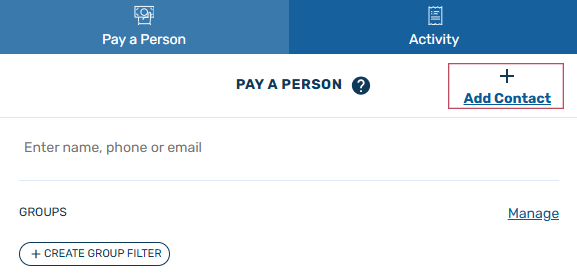
- To get started with sending money, simply click on Add Contact.
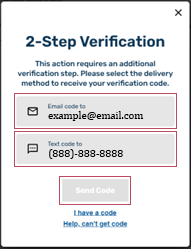
- Choose a delivery method to complete a 2-step verification process, select Send Code. Enter the provided code on the next screen.
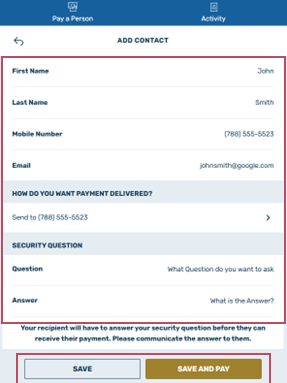
- Complete the profile for your contact, including Name, phone number, email, and security question. Select Save and Pay to continue.
- Enter the amount to send, any memo, select your funding account, the timing of the transaction(s). Select Pay when ready to send.
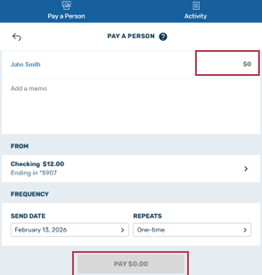
- Confirm your payment.
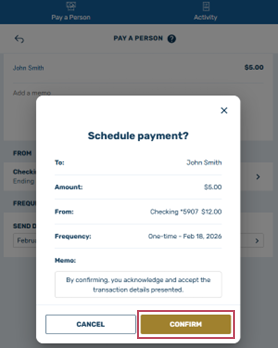
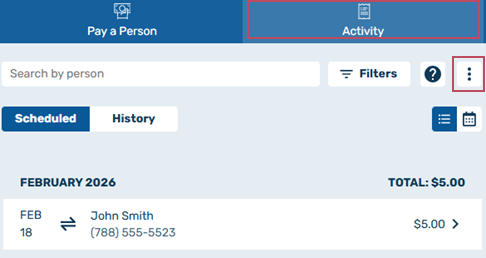
- Click on Activity to see your scheduled payments and history as well as make additional payments. After the initial set up, Payments can be made through the Pay a Person tab at any time. To access Pay a Person settings, simply click on the Activity tab, then clicking the ellipsis (3-dot) icon in the top right.
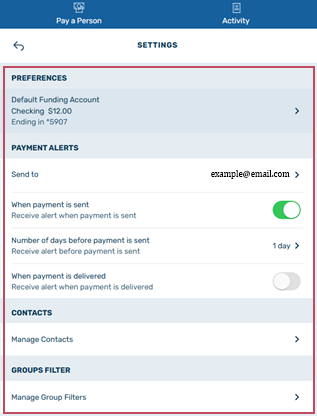
- In the settings menu, you have several options, such as selecting your default funding account and which format you wish payment alerts to be sent through.
Frequently Asked Questions (FAQ's)
Who is Eligible?
OFBC Online or Mobile Banking Clients, 14+ years old with a qualifying checking, savings or money market account are eligible.
Who can I send money to?
Anyone with a checking or savings account at a bank or credit union in the USA.
When can payments by scheduled?
An OFBC Online or Mobile Banking Client can schedule a payment at anytime.
How will the funds be delivered?
The recipient chooses how to accept the funds. Either next day ACH or real time through a debit card or an OFBC checking or savings account.
Can a recipient change their payment delivery method?
Yes. Each time a payment is scheduled for an existing recipient, the recipient receives a notification with a link allowing them to update and/or change the payment delivery method If the transaction is a real-time payment, the contact can only change the delivery for subsequent transfers and not the current one. Changes cannot be made for next-day payments received after cutoff.
When are the funds pulled from my account?
Next day ACH payments are usually debited between 5-6 pm. For payments delivered via debit card or and OFBC account direct, funds transfer in real time.
Are the sender and recipient notified when the payment is delivered?
Yes. Both are notified when a payment is sent and when it is delivered. End users may also opt to receive alerts for additional delivery information.
What happens to the funds if the recipient does not claim them?
After seven (7) days, if the recipient has not claimed the funds, the transaction is canceled; the sender’s account is not debited.
Are the sender and/or recipient notified if a payment is canceled?
Yes. If the recipient does not claim the payment from the sender, the payment will be canceled. Both the sender and recipient are notified the payment link has expired.
Are there fees?
There is a $3.00 fee when a recipient chooses to receive a payment on their debit card. This fee is deducted on the recipient's side. Ex: OFBC Client sends $10.00, recipient receives $7.00.
Is Pay a Person available for Business Accounts?
No, Pay a Person is only available for use with Consumer Checking and Savings Accounts.
{endAccordion}